Showing posts with label PC Softwares. Show all posts

Sunday, April 25

Download Free Office 2010 RTM Product Guides

Soft-storage.blogspot.com :

Courtesy of Microsoft 


Microsoft released Office 2010 to manufacturing on April 15th, and is already allowing MSDN and TechNet subscribers to grab the RTM bits. At the same time, the Redmond company made available for download an extensive collection of resources, designed to help customers get an insight into all the components of the productivity suite. The Office 2010 product guides are currently available at no charge via the Microsoft Download Center. According to Microsoft, the guides “provide an overview of what’s new in your favorite Microsoft Office programs and a deeper look at benefits across all Office 2010 programs, as well as Office Web Apps and Office Mobile 2010.”

There are no less than 12 guides available for download in both .PDF and .XPS formats, focusing on such Office 2010 components as Access, Excel, InfoPath, Office Mobile, Office Web Apps, OneNote, Outlook, PowerPoint, Publisher, SharePoint, Word and also the entire suite. MSDN and TechNet subscribers can already download the RTM development milestone of Office 2010, and turn to the guides in order to get additional information on the product.

“Whether you are a Microsoft Office user or you’re evaluating Office 2010 for your business, the product guides are a great place to start. Explore the Office 2010 product guides for an overview of what’s new and improved in your favorite Microsoft Office programs or for a deeper look at benefits across all Office 2010 programs. Each guide provides an at-a-glance overview, a closer look at many new and improved features, and instructions to help you find the features you want quickly and easily. You’ll also find additional information and resources in some of the guides for power users, IT pros, and developers,” the Redmond company stated.

Office 2010 General Availability is slated for June 2010, although the software giant has yet to provide a specific deadline. Ahead of hitting store shelves, the successor of Office 2007 will be offered to the company’s Volume Licensed customers with Software Assurance on April 27, and to business users in May.

New Firefox 4.0 GUI Facelift Elements Revealed

Soft-storage.blogspot.com :


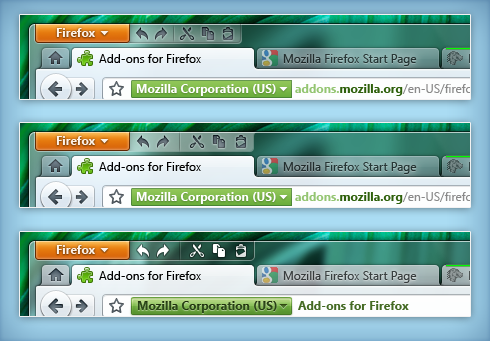
Mozilla is pushing on with the redesign process of Firefox’s graphical user interface. Early adopters that have followed closely the evolution of Firefox 4.0’s facelift will be able to tell that the New Theme project page now features extended timeline after a recent update. At the same time, Firefox 4.0 developer Stephen Horlander has revealed additional elements that are an integral part of the Firefox 4.0 facelift. Users will be able to access screenshots depicting Mozilla’s plans for the evolution of the UI of the next major version of Firefox via the images included at the bottom of this article.

“The new theme for Firefox will modernize the web browser interface, reflecting the power, simplicity and customizability of the world's most popular browser. Ensuring that the application feels like a natural part of the user's desktop, web life, and task flow are key goals,” Mozilla reveals on the New Theme page for Firefox 4.0.

However, as testers running the early Alpha development milestones of Firefox 3.7/ Mozilla Developer Preview 1.9.3 have been able to notice, changes are already being integrated into Minefield releases. The screenshot illustrating Windows Theme Progress is taken from a Firefox 3.7 Alpha build.

But there is additional work that went into the UI overhaul for Firefox 4.0. “Panel Styles - I did some work on styling panels(specifically notifications) on various platforms,” Horlander explained. “Everyone on the UX team liked the Glass Border approach. It is consistent with Windows 7 taskbar panels (with the addition of the half-diamond) and feels lighter. I also did some work on how this could look for panels outside of notifications.”

As users can see from the screenshots, Mozilla is embracing both Windows 7’s Aero Glass and the Ribbon/Fluent GUI specific for the platform’s default apps such as Paint and WordPad. Firefox 4.0 will also feature an “edit tray” that will become visible as users deal with text.

Firefox 3.6.4 Beta is available for download here.

Firefox 3.6 Lorentz Beta (3.6.3 Plugin 1 / v3.6.4) for Windows is available for download
here.

Firefox 3.7 Alpha 4 / Mozilla Developer Preview of Gecko 1.9.3 Alpha 4 for Windows is available here.
Firefox 3.7 Alpha 4 / Mozilla Developer Preview of Gecko 1.9.3 Alpha 4 for Mac OS X is available here.
Firefox 3.7 Alpha 4 / Mozilla Developer Preview of Gecko 1.9.3 Alpha 4 for Linux is available here.

Firefox 3.6.3 for Windows is available for download here.
Firefox 3.6.3 for Mac OS X is available for download here.
Firefox 3.6.3 for Linux is available for download here.

Thursday, April 22

Download Windows 7 Desktop Optimization Pack Refresh

Soft-storage.blogspot.com :


Performance, reliability, security, and compatibility are core tenets of this release

Windows 7 is the next release of the Windows client operating system, built on the secure foundation of Windows Vista and Windows Server 2008. Performance, reliability, security, and compatibility are core tenets of this release as we collect your feedback to meet our engineering goals of making Windows 7 the best-performing and most stable Windows operating system to date. All the new innovations in this product are meant to enhance your capability as an IT professional to better provision and manage increasingly mobile PCs, to protect data, and to improve end-user and personal productivity.

Windows 7 EnterpriseWindows 7 Enterprise was designed specifically for IT Professionals, so that you can test your software and hardware on a final version of the product. In addition, it provides the opportunity for you to become more familiar with the key improvements over previous versions of the Windows operating system, and experience firsthand how Windows 7 can make your PC environment more productive, secure, and manageable.

Guidelines on usage:
- Protect your PC and data. Be sure to back up your data and please don’t test Windows 7 on your primary home or business PC.
- You have 10 days to activate the product. If not activated within 10 days, the system will shut down once every hour until activated. Unsure on how to activate? Visit our FAQ.
- The 90-day Trial is the full working version of the Windows 7 Enterprise, the version most of you will be working with in your corporate environment. It will not require a product key (it is embedded with the download).
- The 90-day Trial will shut down once every hour when you have reached the end of the 90-day evaluation period.
- The 90-day Trial is offered for a limited time and in limited quantity. The download will be available through March 31, 2010, while supplies last.
- After the 90-day Trial expires, if you wish to continue to use Windows 7 Enterprise, please note that you will be required to purchase and perform a clean installation of Windows 7, including drivers and applications. Please keep this in mind; Windows 7 Enterprise is not available through retail channels.
- Technical details/updates/questions: Please review our FAQ or visit the Windows 7 support forum.
- Stay informed. You can keep up with general technical information and news by following the Springboard Series blog. Want technical guidance, tips, and tools? Visit the Springboard Series on TechNet.
- Keep your PC updated: Be sure to turn on automatic updates in Windows Update in case we publish updates for the 90-day Trial.
- Microsoft Partners-: Learn more about Windows 7 on the Microsoft Partner Portal.

Minimum System Requirements*:

1 GHz or faster 32-bit (x86) or 64-bit (x64) processor
1 GB of RAM (32-bit) / 2 GB RAM (64-bit)
16 GB available disk space (32-bit) / 20 GB (64-bit)
DirectX 9 graphics processor with WDDM 1.0 or higher driver
DVD-compatible drive
Internet access (fees may apply)
*Note: Some product features of Windows 7, such as the ability to watch and record live TV, BitLocker, or navigation through the use of “touch,” may require advanced or additional hardware. Windows XP Mode requires an additional 1 GB of RAM and 15 GB of available disk space; and a processor capable of hardware virtualization, with Intel VT or AMD-V turned on.

Microsoft Windows 7 90-Day Eval VHD

This package comes as a pre-configured VHD. This download enables you evaluate Microsoft Windows 7. The Microsoft VHD Test Drive Program provides customers with an enhanced server-based software evaluation experience that’s faster, better supported and more flexible. You can now access the entire catalog of pre-configured Microsoft and partner products and solutions in the VHD format and start evaluating and testing today.

System Requirements
- Supported Operating Systems: Windows 7
- Windows Server 2008 Hyper-V is required to use this virtual machine
In addition to the system requirements for Windows Server 2008 as described in the release notes, a 64-bit system with hardware-assisted virtualization enabled and data execution prevention (DEP) is required.
- It is also recommended to ensure that you have a clean install of x64 edition of Windows Server 2008 to be able to use the Hyper-V technology.

Click here to Download

Download Orkut Mobile Google Social Networking for Mobile

Soft-storage.blogspot.com :


Connect with friends and family using scraps and instant messaging
Discover new people through friends of friends and communities
Share your videos, pictures, and passions all in one place


  • Version:  : v1.0mss
  • Total Downloads: 394,518
         
 Click here to Download.

MSN Hosts James Cameron’s Avatar - Return to the World

Soft-storage.blogspot.com :


Avatar fans are in for a real treat from MSN, with Microsoft announcing plans to debut a Hub dedicated exclusively to the biggest blockbuster in history. The launch of the ‘James Cameron’s Avatar - Return to the World’ MSN Hub site will make the movie phenomenon’s director the first ever international Guest Editor on MSN. According to the Redmond company, Cameron will offer visitors his perspective over 3D filmmaking, but also on environmental topics, as well as on space travel. ‘James Cameron’s Avatar - Return to the World’ is the result of a partnership between MSN and Twentieth Century Fox Home Entertainment, designed to celebrate the release of Avatar on Blu-ray Disc and DVD.


“We are thrilled to have someone of James Cameron’s creative stature contributing to MSN. By checking out ‘James Cameron’s Avatar - Return to the World’ hubsite, fans will gain a new level of appreciation for his work and his general commentary on some of the most pressing issues of our day will certainly spur thought and discussion. This collaboration with Cameron underscores MSN’s commitment to delivering the most comprehensive entertainment news and insights you’ll find anywhere,” Geoff Sutton, general manager, MSN Media International, explained.

The MSN Avatar Hub site is already available for customers in the United Kingdom, France, Germany, Italy and Spain. Content offered to Avatar fans involves video and multimedia features, but also answers from Cameron to questions from users. Visitors will also have the chance to explore Pandora, the moon home of the Na’vi, and also the possibility to become an Avatar. The software giant indicates that Cameron will even speak about the possibility of putting together a Na’vi dictionary.

“Our relationship with MSN has enabled us to effectively engage and excite movie-lovers around the world with dynamic Avatar content in anticipation for the film’s release on high-definition Blu-ray Disc and DVD,” Vincent Marcais, senior vice president marketing, Twentieth Century Fox Home Entertainment, added.

Opera 10.52 RC4 Fixes Crashes on Facebook

Soft-storage.blogspot.com :
In the past couple of days, Opera Software has released two testing versions of Opera 10.52. The Norwegian browser maker is now at the Release Candidate 4 stage in the development process for the second minor update to Opera 10.50. Early adopters trying out RC4 are invited to continue submitting feedback on the evolution of Opera 10.52. Build 3368 is currently available for download for Windows users, but additional releases are offered to testers running Mac OS X and Linux.
However, according to Opera Software, only the Mac and Windows development snapshots of Opera 10.52 are synchronized, with the Linux flavor of the browser lagging behind.

“This is RC4 of 10.52 final for Mac and Windows. It fixes CARAKAN-1144 (Frequent crashes at Facebook) and CORE-27753 (Freezing at Google Maps and dell.com). As always, try to keep comments on-topic. They should be somewhat brief, and yet descriptive enough for other people to be able to reproduce your problem. Post longer comments in the forum, and avoid inline images,” a member of the Opera Desktop Team revealed.

Opera 10.52 Release Candidate 3 was offered to testers on April 21, 2010, just a day ahead of RC4. The rapid pace at which Opera Software is pushing out RC builds of Opera 10.52 indicates that the next release of the browser is close to finalization. After all, Release Candidate is a milestone that inherently points to the latest stages of development.

“As you have noticed we have been trying to kill that NSL bug for a while now. We decided to revert some Cookie behavior to how it was in 10.10 to make it go away for now. So please test for regressions related to cookies/loading of pages. Please tell us if you still get NSL. Your feedback on this bug is very important,” an Opera Desktop team representative said yesterday.

Click here to Download

Sunday, March 28

7 Quick Ways For College Students To Make Money Online

Soft-storage.blogspot.com :


I received an email the other day from a College Student wanting to

know how they could make extra money online. The email stated they

didn’t have a lot of time because of their studies. So after giving it

some thought, I came up with a list of 7 quick ways college students

could make extra money online.

I dismissed blogging in general because it takes some time to get a

blog established and making money (the exception is local websites and

blogs, see below). I assumed the emailer needed money fairly quick.

Here are my suggestions to the emailer.


   1. Project Payday: A few months ago, I experimented with a way to

make money quick online with a program called Project Payday. I took a

day and researched this project online. Seemed real people were making

real money with it. Not getting rich, but making enough extra money

quickly to pay some bills or other stuff. The next day I signed up with

Project Payday, watched the training video’s and browsed the Forums to

get a feel as to how this program worked. In all, this process took me

a few hours. The next day I followed the directions and made myself

available for some “offers”. The first day, I made $30. The next day I

hit it hard for about 6 hours and brought down $70 for my efforts. The

following day, I worked 3 to 4 hours total and made $45. I soon found

out one drawback to this program. It’s boring! No special skills are

needed other than the know-how to operate your computer and use the

Internet, but it is tedious work. I’m not cut out to spend hours behind

a computer! Most people can make money quickly with this program, but

you’ll have to put the time into it. The more time you put into it, the

more money you’ll make generally. It’s not rocket science but you will

have to keep track of the trials you sign up for. If you’re interested,

check out Project Payday by clicking here. It’s free to sign up if you

fill out an offer or you can buy directly into the program. Next you’ll

need to read the promotional literature they have and watch the

training video’s. They even have a guarantee that says if you follow

the simple 4 step process in Method 1 and don’t make money in 24 hours,

they’ll give you $100! This is the best guarantee I’ve seen online. I

doubt anyone will need it though, because I found it easy to make money

with Project Payday although it was boring computer work.


   2. Read Emails – Taking Online Survey’s, etc: In my opinion, this

isn’t as easy as Project Payday, but it’s real close. There are

companies that receive thousands of emails every day that need to be

read. Obviously the CEO or other employees can’t spend every day

reading emails, so they outsource this. There are several companies

where they outsource this type of work as well as other tedious, time

consuming chores such as product testing, online surveys, online

mystery shopping and other. Send Earnings is one such company that

other companies outsource to. Consumers such as you sign up and are

normally paid on a per assignment completed basis. The pay varies by

what type of assignment you choose. You choose where you want to make

money. Click Here to learn more or to sign up for this opportunity.

   3. Become a Freelance Writer – Can you Write a sentence? Then you

may have what it takes to make money as a Freelance Writer. You don’t

have to have a degree in English either. In fact, if you can write in

an easy to read manner, you have what it takes to make money writing

Web content, short stories and other media. You can sell articles on

Forums like DigitalPoint and SitePoint, but don’t expect to make a

whole lot. Or you can sign up for a service like Freelance Home

Writers. Basically this is a job board for Writers where Companies and

Individuals needing Writers post their offers. You can either accept or

reject them, it’s up to you. Click here for more information about the

Freelance Home Writer program and learn how to make money as a

Freelance Writer.


   4. Make Money On Ebay - There are many ways to make money with eBay.

It seems that the 2 most popular ways are either by going to Garage

Sales or Estate Sales and buying stuff to resell. You can make some

decent money this way. Back in 2001 I did this same thing for several

months and I made around 1-1600 per month. But it was long hard work

making all those auctions or driving around looking for deals at Garage

sales. Another way that is becoming more and more popular is people

starting their own online stores with the help of eBay. ProStores is an

ebay company that offers several packages for you to start your online

store. They do a lot of the work of getting set up for you. If this

sounds interesting, give them a test drive. One Month Free Trial!

ProStores – an eBay Company


   5. Become an Online Tutor – I’m not sure what this pays, but I’ve

known people in the past who have worked with companies like e-Tutor,

SmartThinking and Tutor.Com. Online tutoring is an in-demand service

and growing all the time. If you like helping others learn, this could

be just the ticket for you. You will have to set aside a certain number

of hours per week, anywhere from 2 hours on up on average depending

upon which service you go with.

   6. Give eLessons – Do you know MS Word inside and out? Can you make

an Excel spreadsheet scream for mercy? Can you work magic with Quicken?

Well, there are thousands of people who just want to know the basics of

these programs or are looking for some updating. You can advertise on

places such as Craigslist and Kijiji or even the local newspaper. You’d

be surprised at the number of people just wanting to learn the basics

on operating a computer and who are willing to pay someone to teach

them!

   7. Become an Online Juror – Even Lawyers need to practice! There are

places such a eJury and TrialJuries.Com that stage mock trials. The

Jurors get paid anywhere from $5 to $60 depending on how complex the

case is. There’s no guarantee you’ll get a case, but it has to better

than cleaning up after the old folks at the Senior Citizen Center! Many

colleges have access to these mock jury trials, but from what I’ve been

told, they don’t pay as much as the online jury pools. Also, as with

anything in life, if you slack off on the Jury, don’t expect to be

called back. The more you pay attention and get involved, the more

likely they’ll “keep your name around.”

Some college students show up on the first day in a bright shiny BMW

convertible. Those are the ones who do not need help. For most College

Students, a few extra dollars a month goes a long ways in making it

easier to study for their classes. If you’re in a pinch, there’s no

need to run down to the Blood Center to give blood, just turn your

computer on and go to work.
Saturday, March 13

Online Armor ++ 4.0.0.15


Soft-storage.blogspot.com :

Protect yourself against numerous types of malware

Online Armor++ comes with all of the power of Online Armor, but additionally includes the award-winning dual Emsisoft / Ikarus Dual Antivirus and Antimalware engine!

Online Armor protects your passwords and private information from being stolen by blocking the keylogger as it tries to activate. Online Armor's behaviour detection ensures that even specially created or new keyloggers are detected and prevented.

"Phishing" is the name of a scam which uses fake emails and websites to trick users into disclosing personal information. Online Armor checks inbound mail for tricks used by scammers and, depending on the certainty it will warn you or remove the email. The mail filter works with any email client that supports POP3 or IMAP, including Outlook, Outlook Express, Thunderbird, The Bat, Incredemail, Eudora and others.

Many websites use tricks to install dangerous software on your computer. The type of software can range from the irritating display of popup advertising, through to software designed to steal information or defraud you.

In addition, Online Armor++ will enable you to control and select the programs that will automatically start when you open your PC. This can be used to help defeat spyware (it must start sometime) as well as optimize your computer's performance.

Malicious programs are getting tougher and tougher and often attack other programs (including security programs) to do their nasty deeds. Online Armor has a process guard function which guards not only itself against tampering, but protects other programs from malicious code.

NOTE: Use this trial key if prompted.

Here are some key features of "Online Armor ++":

· Easy to use: You do not need a computer science degree to use Online Armor. The setup process is straightforward, and configuration is one-time event and part of the initial installation process.

· Light on Pop-ups: Online Armor's aim is not to annoy you with too many messages and when it does gives you message they give you clear options on how to respond.

· Doesn't slow down your PC: Online Armor does not slow down your PC.

· Personal Firewall: Online Armor's new personal firewall provides awesome protection from inbound threats and complete control of data leaving your computer for the internet.

· Online Banking Protection: Never worry about banking online again. Online Armor banking mode is a standout feature locking down your session while you are doing your banking online.

· Identity Theft Protection: Probably the number one threat online; identity theft ruins lives. Online Armor protects you from phishing and key logging techniques that these criminals use.

· Safe Browsing: This allows you to lock down your online browsing sessions and protect yourself from malicious websites from installing nasties on your machine.

· Prevent Spyware: The program blocker gives you control of which programs are allowed to run on your computer. Known safe programs don’t harass you with popups, and dangerous programs will give a red warning popup so you can prevent them from running.

· Remove Spyware: If spyware gets onto your computer - perhaps because you have accidentally allowed it, Online Armor will allow you to remove it. Unwanted extensions to internet explorer can be removed with a mouse-click. Unwanted programs can be blocked with the program blocker, or removed completely.

Requirements:

· 512 MB RAM
· 20 MB hard disk space
· Internet access
· Download Size: 10 mb


Click here to Download.

Norton Ghost 9.0


Soft-storage.blogspot.com :

Noston Ghost is the premier backup solution

Noston Ghost helps keep the data on your hard drive safe. With its new Windows interface and improved performance, this new version maintains its position as the premier disk imaging utility for the proficient PC user.

Whether you want to create an exact image of your hard drive for easy recovery, or upgrade to a new system, you can depend on the proven technology of Drive Image.

Features:

· Make backup simple with a user-friendly Windows interface and step-by-step wizards.
· Save your backup to virtually any internal or external drive (CD or DVD burners, USB or FireWire devices, network locations).
· Schedule automatic backups for any time you select.
· Mount your backup as a drive letter for easy access.
· Use "hot imaging" to create backups without EVER leaving Windows.
· Protect all the information on your computer, not just application files.
· Compressed drive images saves valuable disk space.
· Restore your entire system or just selected files � you choose.
· Transfer all your data from one computer to another without hassle


Click here to Download.

WinX HD Video Converter Deluxe [GIVEAWAY] 2.0

Soft-storage.blogspot.com :


Help you convert all different videos at will

To get the full version for free, please download this program and register with this License Code: WINHCD-GIVE-AWAY-2010.

Stop searching video converter software right now! No matter what files you have and what you need to convert to, WinX HD Video Converter Deluxe can help you easily realize. Allowing for maximum compatibility, this powerful video converter software enables users to convert almost all video files to general video files, popular HD video files, and convert video to fit iPhone, iPod, iPad devices, Sony PSP, PS3 devices, Microsoft devices and portable devices such as PDA, Blackberry, Mobile Phones, etc.

In addition, this application will also offer you the possibility to extract audio from video files as well as encode them to popular music files.

Here are some key features of "WinX HD Video Converter Deluxe [GIVEAWAY]":

· Convert video files to popular general video formats such as AVI, MP4, FLV, AVC, MPEG, WMV, MOV, etc
· Convert video files to popular HD video formats including HD AVI, HD MP4, HD MPEG, HD TS, HD WMV, HD MOV and HD YouTube
· Convert video files into iPhone, iPod, iPad, Apple TV, Apple TV HD, PSP, PS3, PS3 HD, Xbox, Xbox HD, Zune, Zune HD, PDA, Blackberry, ZEN and Mobile Phones
· Separate audio from video files and convert to popular music formats
· Capture pictures from video and backup as BMP or JPG files
· Support both single and batch conversion
· Multi-core CPU supported
· Enable users to rename output video files at will through "renaming template"
· Enable users to control output video quality, image size. Freely adjust all video/audio parameters
· Offer easy-to-use functions, super fast converting speed, best quality and 100% stable process


Click here to Download.

Undelete Plus 3.0.0.602

Soft-storage.blogspot.com :


A quick and effective way to retrieve accidentally deleted files

The UndeletePlus application was designed to be a small utility that scans your hard drive for all files that can be undeleted and attempt to salvage the file for you.

Sounds like magic? It isn't. You might not know it, but when you tell Windows to erase a file, Windows essentially does something like say "okay, I am now going to consider this file null and void, and will allow other data writing operations to use the space that it occupies". In other words, no actual 'erasing' of the file occurs until Windows has a need to write over the hard drive space where that the file resides. UndeletePlus and programs like it do a thorough scan for files that are 'still there' on the hard drive and/or files that have enough data remaining that they can be salvaged.

Of course, the sooner you attempt to recover the file the better your chances. Also, smaller size files have a higher chance of being salvaged, and disks that have not been defragmented are better candidates for file recovery.

UndeletePlus is a quick and effective way to retrieve deleted files, files removed from the Recycle Bin, in a DOS window, from Windows Explorer with the SHIFT key held down. UndeletePlus with its clean and simple interface, is a small, fast, useful, practical and powerful.

There's nothing quite like losing an important file you spent hours working on. But, just because you deleted it doesn't mean it's gone for good. You can use software to recover files that have been deleted. It isn't always foolproof. But many times you'll have some luck.

The program supports all Windows file systems for hard and floppy drives including FAT12/16/32, NTFS/NTFS5 and image recovery from CompactFlash, SmartMedia, MultiMedia and Secure Digital cards.

Here are some key features of "Undelete Plus":

· After scanning your hard drive, UndeletePlus creates file-type icons in the left margin of the screen that allow you to easily filter by file type
· UndeletePlus will create folder view for the deleted files.
· UndeletePlus will also allow filtering by size, date modified, and parts of the file name
· UndeletePlus is a small, fast, useful, practical, and powerful.

Limitations:

· To recover deleted files you need to register

What's New in This Release:

· branding changed
· small interface improvements

Click here to Download.

Password Recovery for Google (formerly Gmail Password Recovery) 1.02.01.10

Soft-storage.blogspot.com :


Recovers lost or forgotten Google password within a click.

Google Password Recovery is a lightweight utility that searches your system for encrypted Googlel passwords, extracts them, decrypts and decodes them and displays them in a readable format.

The program will search the following places for saved passwords: Google Talk, Gmail Notifier, Google Desktop, Picasa2, Google Photos Screensaver, Internet Explorer, Mozilla Firefox. Program only works when the password is saved in at least one of the above listed programs.

Here are some key features:

· Decrypt Google password (Google Account password decrypter)
· Decode Google Account passwords (Google password decoder)
· Crack Google account passwords (Google Account password cracker)
· Recover Google Account password (Google password recovery)
· Find Google passwords (Google Account password finder)
· Google Account password ripper (rip Google passwords)
· Google remote account hacker (not implemented)
· Google account password hacker (will hack Google passwords for saved accounts only on local accounts)
· All versions of Google Talk; Gmail Notifier, Google Desktop, Picasa, Google Photos Screensaver, Internet Explorer & Mozilla Firefox are supported

Requirements:

· 1 MB hard disk space


Click here to Download.

Sunday, August 16

Kaspersky Anti-Virus Personal 2010 9.0.0.463


Soft-storage.blogspot.com :

The concept of your computer protection by Kaspersky Anti-Virus 2010:

Kaspersky Anti-Virus 2010 ensures protection of your computer against known and new threats. Each type of threat is processed by a separate application component. This makes setup flexible, with easy configuration options for all components, which can be tailored to the needs of a specific user or the business as a whole.

Kaspersky Anti-Virus 2010 includes the following protection tools:

  • Protection components providing protection of:
    • files and personal data;
    • system;
    • network activity.
  • Virus scan tasks used to scan individual files, folders, drives, areas or the entire computer for viruses.
  • Update, ensuring the up-to-date status of the internal application modules, and the databases used to scan for malicious programs, and to detect network attacks and spam messages.
  • Wizards and tools facilitating the execution of tasks occurring during the operation of Kaspersky Anti-Virus 2010.
  • Support features that provide information support for working with the program and expanding its capabilities.

What’s new in Kaspersky Anti-Virus 2010?

Kaspersky Anti-Virus 2010 is a comprehensive data protection tool. The multifaceted protection covers all channels for data transfer and exchange. Flexible configuration provided for any component lets users completely adapt Kaspersky Anti-Virus to their specific needs.

Let us take a closer look at the innovations in Kaspersky Anti-Virus 2010.

The new in protection:

  • New component IM Anti-Virus ensures safe operation of various applications for instant messaging. Component scans messages for the presence of malicious objects.
  • Kaspersky Anti-Virus 2010 includes the URL scanning module managed by Web Anti-Virus. This module checks if links located on the web page belong to the list of suspicious and phishing web addresses. This module is built in Microsoft Internet Explorer and Mozilla Firefox browsers as a plug-in.
  • Monitoring access to phishing websites and protection against phishing attacks are performed by scanning links in messages and on web pages, and also by using the database of phishing addresses when an attempt to access websites is detected. You can check web addresses if they are included in the list of phishing web addresses; this option is only available for Web Anti-Virus (and IM Anti-Virus).
  • A new tool called vulnerability scan has been added in the list of scan tasks; it makes easy to detect and eliminate security threats and vulnerabilities in the applications installed on your computer and in the operating system's settings.

The new in the interface:

  • A new approach to the protection management called My Protection has been implemented. Computer protection is ensured in three different directions: user's files and personal data, operating system objects and applications installed on the computer, and network activity. A specific set of Kaspersky Anti-Virus 2010 components is applied to each of the protection directions. With My Protection, the user can find out which component provides protection for a certain resource category, and quickly switch to editing its settings.
  • Wizards and Tools, which help execute specific tasks of providing computer's security, are grouped in the Security+ section.

Main known issues:

  • If a threat in OLE object is detected, the application does not suggest user to perform disinfection. Possible actions in this case – place file to quarantine or delete it.
  • Web Anti-Virus does not notify user about the downloaded files.
  • Problems with display of some files in special defragmentation software - PageDefrag are possible.
  • In some cases the "^" key on the virtual keyboard stays pressed. To solve this problem, right-click this key with a mouse.
  • Complex filtering works incorrectly in some report windows.
  • When the option of logging file system events to application report is enabled, noticeable slowdowns are possible during installation, if Kaspersky Anti-Virus 2010 is being installed over the previous version.
  • During Kaspersky Anti-Virus 2010 uninstallation registry keys linked to shell extension are not removed.


CLick here to Download.

Friday, August 14

Mozilla Firefox -3.6 for mac


Soft-storage.blogspot.com :

Firefox® is an award-winning Web browser that is fast, secure, and fully customizable to your online life. Try out the latest version for the speediest, safest and most advanced Firefox yet.

Things move quickly online, and we’ve beefed up the engine that runs Firefox to make sure you can keep up: Firefox 3.6 is more than twice as fast as Firefox 3, and ten times as fast as Firefox 2.* As a result, Web applications like email, photo sites and your favorite social networks will feel snappier and more responsive.


Click here to Download.

FileZilla 3.2.7


Soft-storage.blogspot.com :

Overview

FileZilla Client is a fast and reliable cross-platform FTP, FTPS and SFTP client with lots of useful features and an intuitive graphical user interface.

Features

Among others, the features of FileZilla include the following:

  • Easy to use
  • Supports FTP, FTP over SSL/TLS (FTPS) and SSH File Transfer Protocol (SFTP)
  • Cross-platform. Runs on Windows, Linux, *BSD, Mac OS X and more
  • IPv6 support
  • Available in many languages
  • Supports resume and transfer of large files >4GB
  • Powerful Site Manager and transfer queue
  • Bookmarks
  • Drag & drop support
  • Configurable transfer speed limits
  • Filename filters
  • Network configuration wizard
  • Remote file editing
  • Keep-alive
  • HTTP/1.1, SOCKS5 and FTP-Proxy support
  • Logging to file


Click here to Download.

Saturday, August 8

Original File Splitter


Soft-storage.blogspot.com :

FileSplitter is a freeware and open source, no frills tool to split up files into a specified number of chunks. Whether you're on dialup and need to transfer large files over the internet without worrying about timeouts or disconnection; want to send that large presentation or document via email or even put that movie file on rapidshare, FileSplitter will chop down your file into more manageable pieces in 4 clicks on your mouse.

Also in the download package is FileUnite which does the exactly the opposite and reconstructs your file. Using exactly the same interface as the splitter means you don't have to learn to use two different tools, plus it automatically deletes all the pieces so you don't need to have 2 times the size of the original file free on your hard drive to unite them.

Both programs feature a progress bar so you can see how far along the current operation is and how long is left until completion. No installation is required, just unzip the downloaded file and you're all set to cut up as good as DJ Jazzy Jeff.


CLick here to Download.

Google Earth - 3d


Soft-storage.blogspot.com :

A program that lets you to explore, search and discover any location on earth

With Google Earth you can explore the earth from above! Want to know more about a specific location? Dive right in -- Google Earth combines satellite imagery, maps and the power of Google Search to put the world's geographic information at your fingertips.

Google Earth puts a planet's worth of imagery and other geographic information right on your desktop. View exotic locales like Maui and Paris as well as points of interest such as local restaurants, hospitals, schools, and more.


Click here to Download.

Super fast Shutdown


Soft-storage.blogspot.com :

SuperFast Shutdown - A utility to instantly shutdown or reboot your PC

Have you ever wished there was a faster way to shutdown your Windows 2000 or Windows XP computer system ?

I mean instantly shut it down! Now you can! Just install Super Fast Shutdown and click on one of the desktop icons created to reboot or shutdown instantly

Note: Superfast Shutdown is extremely powerful! Use at your own risk! Although it has never been reported, regular usage could possibly cause disk corruption.


Click here to Download.

FolderSize_2.4


Soft-storage.blogspot.com :

FolderSizes is a useful and powerful program which people everywhere are using to understand their hard disk space utilization.


FolderSizes works by scanning a hard drive or folder of your choice and providing visual feedback on the results.

BulletProof FolderSizes generates detailed and graphical drive space usage reports on the fly, while it's scanning your system.

You can drill into any subfolder with a double-click (in the detail list or the graph image), allowing you to quickly locate the source of excessive hard drive space consumption.

FolderSizes goes far beyond the capabilities of competing solutions by combining several tools into one:

· Disk Space Explorer - Awesome detail view, coupled with stunning graphical bar and pie graphs
· Duplicate File Report - Quickly isolate and manage duplicate files within any folder or volume
· Largest Files Report - FolderSizes can quickly show you which files are eating up the most space
· Oldest Files Report - Use your own criteria to find old files that may no longer be needed
· Temporary File Report - Eliminate temp file clutter left over from software installs, downloads, browsing, etc.
· File Owners Report - Discover which users are consuming the most space on local and network drives
· File Types & Attributes Reports - See the distribution of disk space by file type or attributes
· Drive Space Monitor - Instant, at-a-glance view of any local, mapped, or removable disk
· File Sizes, Names & Dates Reports - NEW in 3.0! Powerful, customizable range-oriented file reports
· Scan Filtering - Filter file system scans by filename, date, owner name, and more
· Integrated Search - Search multiple paths by nearly any file criteria (including file owner)


Click here to Download.

Folder lock- Key


Soft-storage.blogspot.com :


Password protect and lock your files and folders from others in seconds

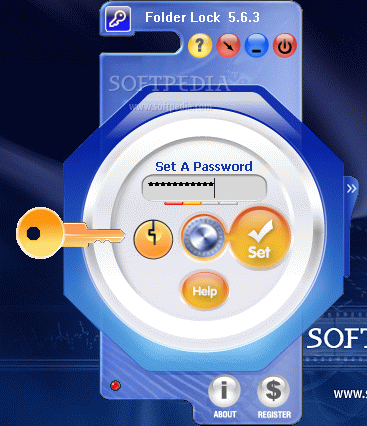
Folder Lock is a fast file-security softwares that can lock, hide or encrypt any number of files, folders, pictures and documents in seconds. It is fast, reliable, portable and convenient. Folder Lock is a computer software application that password protects and locks your personal files and folders.

Folder Lock it makes your files undeletable, hidden and highly secure, hides files from kids, friends and co-workers, safeguards them from viruses, trojans, worms and spyware, protects them from networked computers, cable users and hackers.

Files can also be protected on USB Flash Drives, Memory Sticks, CD-RW, floppies and notebooks. Protection works even if files are taken from one PC to another on a removable disk, without the need to install any software.

You can optionally lock and/or encrypt files & folders. It can even lock your PC. It locks files on kernel level, Windows Explorer and even real DOS Mode.


Click here to Download.